

Tutorial: Visualize a state machine in Stately
Turn an @typeonce/effect-machine machine into an interactive statechart in
stately.ai/viz — without adopting XState as your
runtime. This walkthrough uses the send-money lifecycle sample that ships with
the docs.
For the full reading contract (state trees, targets, MachineJSON, coverage gate), see State Machines.
What you will do
Section titled “What you will do”- Start from the sample — a machine that mirrors the transfer workflow
- Export an XState
createMachineconfig witheffect-analyze - Paste it into the Stately visualizer
- Read the resulting diagram — Advance path, Fail sinks, invoke, finals
Step 1 — Start from the sample
Section titled “Step 1 — Start from the sample”The machine lives next to the Effect pipeline it models:
apps/docs/samples/observability-transfer/transfer-lifecycle.ts
Dense Advance / Fail events at every active stage, named branches the
analyzer reads as guards, state-owned work, and two explicit finals:
export const TransferStates = Machine.states({  Validating: {},  FetchingRate: {},  Converting: TransferState.cases.Converting,  Executing: {},  Confirming: TransferState.cases.Confirming,  Done: { type: 'final' },  Failed: { type: 'final' },})
export const TransferEvents = Machine.events(  Schema.TaggedUnion({ Advance: {}, Fail: {} }),)
export const TransferLifecycle = Machine.make({  states: TransferStates.states,  events: TransferEvents,  initial: (to) => to.Validating(),}).handle({  // …  Converting: {    on: {      Advance: (to) =>        to          .branches({            sufficientFunds: { target: to.full.Executing() },            insufficientFunds: { target: to.full.Failed() },          })          .resolve(({ state, select }) =>            state.sufficientFunds              ? select.sufficientFunds.from()              : select.insufficientFunds.from(),          ),      Fail: (to) => to.full.Failed(),    },  },  Executing: {    invoke: (from) =>      from        .effect('executeTransfer', () => executeTransfer)        .onDone((to) =>          to.full.Confirming().resolve(({ target }) => target.from({ retryable: true })),        )        .onFailure((to) => to.full.Failed()),    on: {      Fail: (to) => to.full.Failed(),    },  },  // …})
The Effect program in send-money-workflow.ts still does the real work. This
machine is the model the analyzer diagrams and checks.
Step 2 — Export the XState config
Section titled “Step 2 — Export the XState config”From the repo root (after installing / building the CLI):
npx effect-analyze \ ./apps/docs/samples/observability-transfer/transfer-lifecycle.ts \ --format xstate-configYou get a paste-ready module. The same config is also embedded in the local visualizer page:
npx effect-analyze \ ./apps/docs/samples/observability-transfer/transfer-lifecycle.ts \ --format statechart-html --openStep 3 — Paste into Stately
Section titled “Step 3 — Paste into Stately”- Open stately.ai/viz
- Replace the editor contents with the generated config (below)
- Click Visualize
import { createMachine } from 'xstate';
export const TransferLifecycleMachine = createMachine({  id: 'TransferLifecycle',  initial: 'Validating',  states: {    Validating: { on: { Advance: 'FetchingRate', Fail: 'Failed' } },    FetchingRate: { on: { Advance: 'Converting', Fail: 'Failed' } },    Converting: { on: { Advance: [{ target: 'Executing', guard: 'sufficientFunds' }, { target: 'Failed', guard: 'insufficientFunds' }], Fail: 'Failed' } },    Executing: { invoke: { src: 'executeTransfer', id: 'executeTransfer', onDone: 'Confirming', onError: 'Failed' }, on: { Fail: 'Failed' } },    Confirming: { on: { Advance: 'Done', Fail: [{ target: 'Confirming', guard: 'retry' }, { target: 'Done', guard: 'giveUp' }] } },    Done: { type: 'final' },    Failed: { type: 'final' }  }});
Step 4 — What you should see
Section titled “Step 4 — What you should see”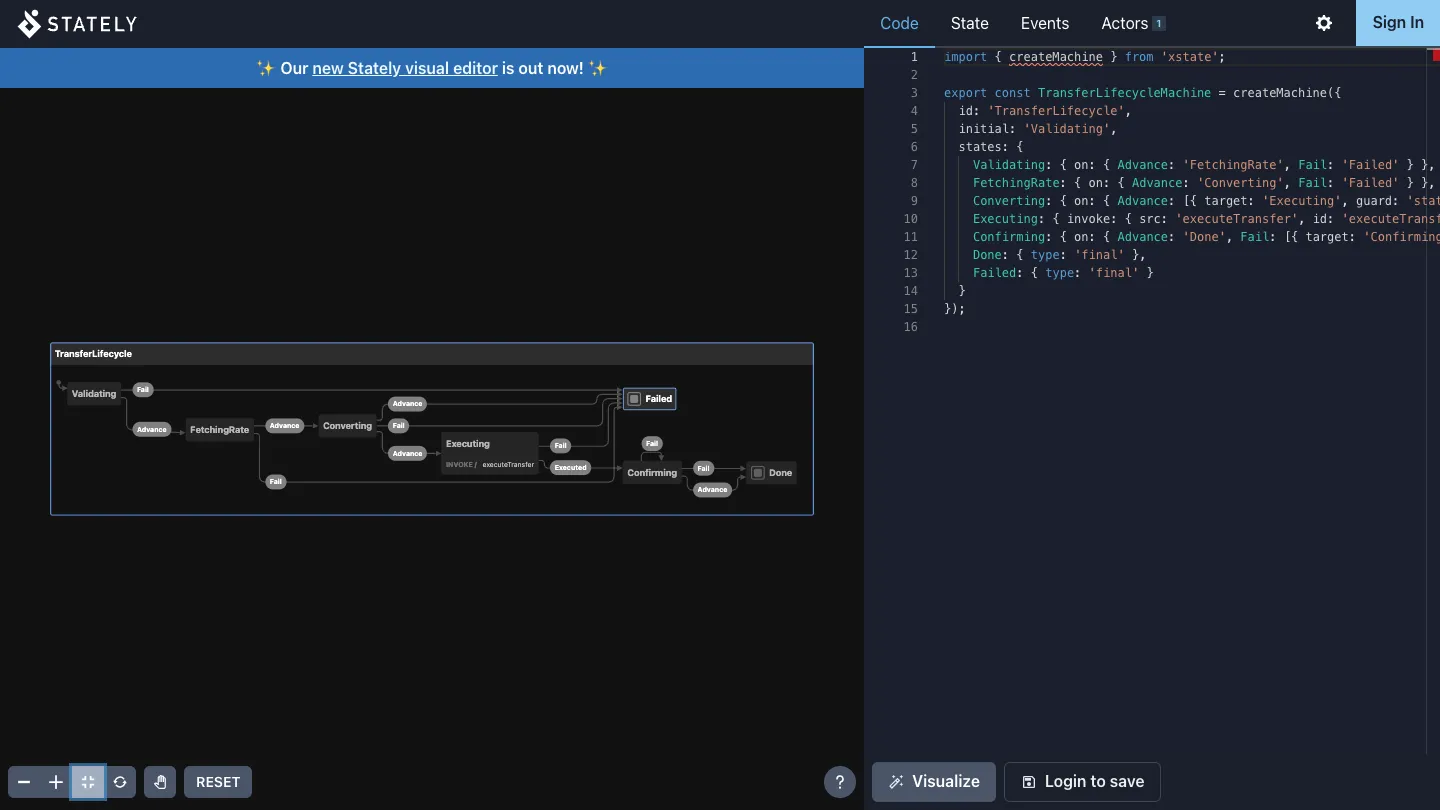
In the diagram:
- Happy path —
Validating→FetchingRate→Converting→Executing→Confirming→Done - Fail sinks —
Failfrom active stages into theFailedfinal - Invoke —
ExecutingshowsINVOKE / executeTransfer, withonDonecarrying the machine toConfirmingandonErrortoFailed - Guarded choices —
Convertinghas twoAdvanceedges andConfirmingtwoFailedges, one per branch (the legacy visualizer draws the alternatives but does not print the guard text; it is in the config) - Finals —
DoneandFailedrender as final states
The machine is live in the visualizer: the Events panel only enables the events the current state handles, so you can step through the workflow and confirm the targets resolve.
Keep the machine honest in CI
Section titled “Keep the machine honest in CI”After you change the machine, gate structural completeness on the sample:
npx effect-analyze \ ./apps/docs/samples/observability-transfer/transfer-lifecycle.ts \ --format statechart-coverage --min-coverage 60Next: the full reading contract, hierarchy, and coverage semantics in State Machines.