

Semantic Diff
The semantic diff compares two versions of an Effect program at the IR level, not the text level. It reports structural changes - steps added, removed, modified, or moved - giving you a meaningful view of what changed in the program’s behavior.
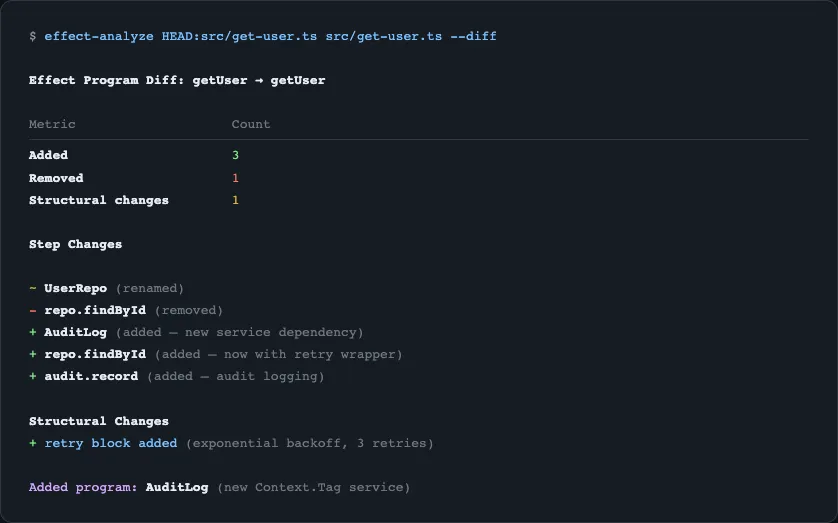
Basic Usage
Section titled “Basic Usage”Compare the current file with the last commit:
npx effect-analyze HEAD:src/transfer.ts src/transfer.ts --diffSingle-File Shorthand
Section titled “Single-File Shorthand”With a single argument and --diff, the analyzer compares HEAD against the working copy:
npx effect-analyze src/transfer.ts --diffThis is equivalent to HEAD:src/transfer.ts src/transfer.ts --diff.
Git Ref Syntax
Section titled “Git Ref Syntax”Use any git ref with the ref:path syntax:
# Compare two branchesnpx effect-analyze main:src/transfer.ts feature:src/transfer.ts --diff
# Compare specific commitsnpx effect-analyze abc123:src/transfer.ts def456:src/transfer.ts --diff
# Compare a tag with the working copynpx effect-analyze v1.0.0:src/transfer.ts src/transfer.ts --diff
GitHub PR Support
Section titled “GitHub PR Support”Diff files from a GitHub pull request by providing the PR URL:
npx effect-analyze https://github.com/org/repo/pull/42 --diffThis fetches the base and head revisions of the PR and compares all changed Effect files.
What the Diff Detects
Section titled “What the Diff Detects”The diff engine classifies every step in both versions:
| Change Type | Description |
|---|---|
| Unchanged | Step exists in both versions with the same structure |
| Moved | Step exists in both but at a different position |
| Added | Step exists only in the new version |
| Removed | Step exists only in the old version |
| Renamed | Step exists in both but with a different name or callee |
Beyond individual steps, the diff also reports:
- Added programs - entirely new Effect programs in the file
- Removed programs - Effect programs that no longer exist
- Complexity changes - shifts in cyclomatic and cognitive complexity
Output Formats
Section titled “Output Formats”The diff respects the --format flag:
Markdown (Default)
Section titled “Markdown (Default)”npx effect-analyze HEAD:src/transfer.ts src/transfer.ts --diffProduces a structured markdown report with added/removed/modified steps highlighted.
npx effect-analyze HEAD:src/transfer.ts src/transfer.ts --diff --format jsonMachine-readable diff object for CI integration.
Mermaid
Section titled “Mermaid”npx effect-analyze HEAD:src/transfer.ts src/transfer.ts --diff --format mermaidA Mermaid diagram with color-coded nodes showing what changed.
Regression Mode
Section titled “Regression Mode”Flag removed steps as regressions - useful in CI to catch accidental deletions:
npx effect-analyze HEAD:src/transfer.ts src/transfer.ts --diff --regressionIn regression mode, removed steps are marked with a warning. Combine with --format json to parse the output in CI scripts and fail the build if regressions are detected.
Programmatic Usage
Section titled “Programmatic Usage”import { analyze, diffPrograms, renderDiffMarkdown } from "effect-analyzer"import { Effect } from "effect"
const before = await Effect.runPromise(analyze("./old-version.ts").single())const after = await Effect.runPromise(analyze("./new-version.ts").single())
const diff = diffPrograms(before, after)const report = renderDiffMarkdown(diff)
console.log(report)Additional rendering functions:
import { renderDiffJSON, renderDiffMermaid } from "effect-analyzer"
// JSON outputconst json = renderDiffJSON(diff)
// Mermaid diagram with change highlightsconst mermaid = renderDiffMermaid(diff)Related
Section titled “Related”- Coverage Audit - project-wide analysis
- CLI Reference -
--diffand--regressionflags - Complexity Metrics - track complexity changes over time