

Service Maps
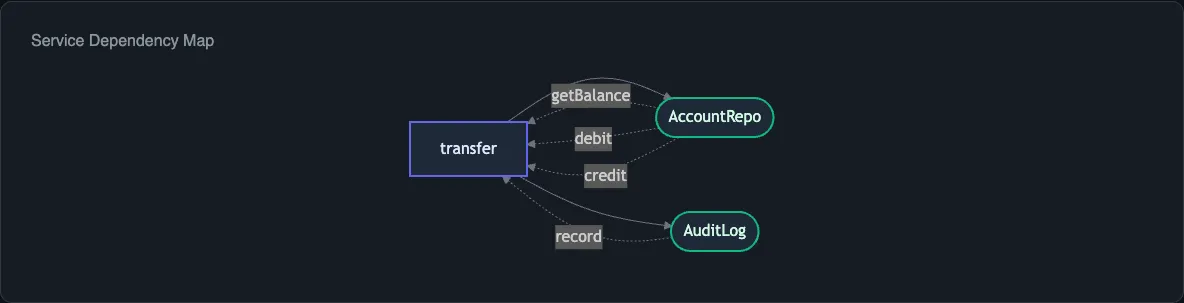
The service map diagram shows which Context.Tag services your Effect program depends on and how steps in the program consume those services. For project-wide analysis, the --service-map flag produces a deduplicated registry of all services across your codebase.
Generating a Service Map
Section titled “Generating a Service Map”npx effect-analyze ./src/transfer.ts --format mermaid-servicesThis produces a Mermaid diagram that groups steps by the services they require. Each service appears as a node, with edges connecting it to the steps that consume it.
For a program that depends on AccountService and AuditLog:
graph TB subgraph Services S1[AccountService] S2[AuditLog] end S1 --> getBalance S1 --> debit S1 --> credit S2 --> audit.recordWhen Auto Mode Selects Services
Section titled “When Auto Mode Selects Services”Auto mode includes a service map when your program has two or more distinct Context.Tag dependencies. Programs with a single service or no services skip this view in favor of more relevant diagrams.
Project-Wide Service Map
Section titled “Project-Wide Service Map”When analyzing a directory, use --service-map to discover all services across the project and see which files consume them:
npx effect-analyze ./src --service-mapThis deduplicates services that appear in multiple files and produces a consolidated registry showing:
- Every
Context.Tagdefined in the project - Which files provide implementations (via
Layer) - Which files consume the service (via
yield*orEffect.provideService)
Programmatic Usage
Section titled “Programmatic Usage”Generate service maps through the library API:
import { analyze, renderServiceGraphMermaid } from "effect-analyzer"import { Effect } from "effect"
const ir = await Effect.runPromise(analyze("./src/transfer.ts").single())const diagram = renderServiceGraphMermaid(ir)
console.log(diagram)
For project-wide analysis:
import { buildProjectServiceMap } from "effect-analyzer"
const serviceMap = buildProjectServiceMap(allIRs)// serviceMap.services - Map of service name to ServiceArtifact
The ServiceArtifact type contains:
tagName- theContext.Tagidentifierproviders- files and layers that provide an implementationconsumers- files and steps that consume the service
Colocated Output
Section titled “Colocated Output”When running in directory mode with --colocate, each generated .effect-analysis.md file includes the service dependencies for that file’s programs:
npx effect-analyze ./src --colocateThis writes a *.effect-analysis.md file next to each source file, containing diagrams, complexity metrics, and the service dependency list.
Related
Section titled “Related”- Diagram Overview - how auto-detection selects diagrams
- Library API -
buildProjectServiceMap,renderServiceGraphMermaid - Coverage Audit - project-wide analysis including service usage