

Railway Diagrams
The railway diagram is the signature visualization of effect-analyzer. Inspired by the railway-oriented programming pattern, it renders your Effect program as a straight-line happy path with error branches forking off at failure points.
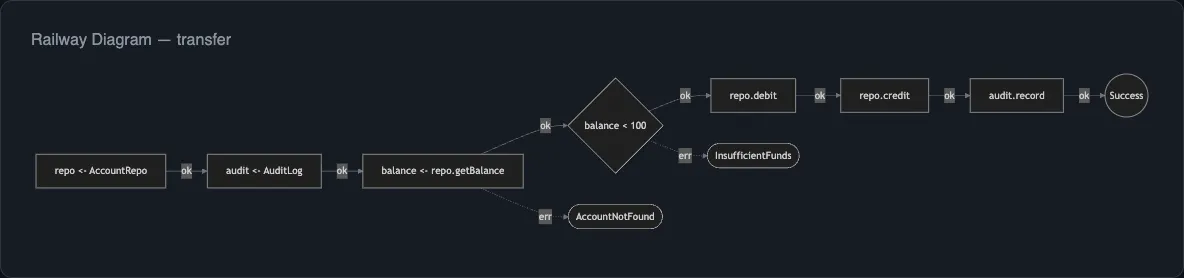
The Railway Pattern
Section titled “The Railway Pattern”In a railway diagram, the main track represents the success path - the sequence of operations that execute when everything goes right. At each point where a failure can occur, an error branch splits off to show what happens on failure.
This makes it immediately clear:
- What the program does when it succeeds
- Where failures can happen
- What error types are produced at each point
Generating a Railway Diagram
Section titled “Generating a Railway Diagram”npx effect-analyze ./src/transfer.ts --format mermaid-railwayFor the transfer program from the Quick Start, this produces a Mermaid diagram like:
graph LR A[getBalance] --> B{balance < amount?} B -->|yes| E1[InsufficientFunds] B -->|no| C[debit] C --> D[credit] D --> F[audit.record] F --> G[Return result] C -.->|error| E2[AccountNotFound] D -.->|error| E3[AccountNotFound]The solid arrows trace the happy path. Dashed arrows indicate error branches.
When Auto Mode Selects Railway
Section titled “When Auto Mode Selects Railway”Auto mode picks the railway diagram as the baseline when your program has:
- Low cyclomatic complexity - few branching points
- Linear structure - mostly sequential
yield*steps in a generator - No parallel or race patterns - those push auto mode toward the concurrency view
Programs with Effect.gen and a series of yields are the ideal fit for railway diagrams.
Direction
Section titled “Direction”Railway diagrams default to left-to-right (LR) flow, which reads naturally as a timeline. Override this with the --direction flag:
npx effect-analyze ./src/transfer.ts --format mermaid-railway --direction TB| Direction | Best For |
|---|---|
LR | Default - reads like a timeline |
TB | Tall, narrow programs |
RL | Right-to-left reading order |
BT | Bottom-up flow |
Programmatic Usage
Section titled “Programmatic Usage”Generate railway diagrams through the library API:
import { analyze } from "effect-analyzer"import { renderRailwayMermaid } from "effect-analyzer"import { Effect } from "effect"
const ir = await Effect.runPromise(analyze("./src/transfer.ts").single())const diagram = renderRailwayMermaid(ir, { direction: "LR" })
console.log(diagram)
Style Guide Mode
Section titled “Style Guide Mode”Enable --style-guide for cleaner diagrams that apply readability heuristics - collapsing trivial nodes, shortening labels, and reducing visual noise:
npx effect-analyze ./src/transfer.ts --format mermaid-railway --style-guideWhen to Use Other Diagrams
Section titled “When to Use Other Diagrams”Railway diagrams work best for linear, sequential programs. If your program has:
- Heavy branching - use
mermaid-decisionsor the standardmermaidflowchart - Parallel operations - use
mermaid-concurrency - Complex error handling - use Error Flows
- Many services - use Service Maps