wrangler-deploy
+ payments-db-pr-42 (d1) created
+ cache-kv-pr-42 (kv) created
+ outbox-pr-42 (queue) created
+ payment-api-pr-42 deployed
+ batch-workflow-pr-42 deployed
+ event-router-pr-42 deployed
Verification: 8 passed, 0 failed
Not just deploys. A live dashboard for the whole runtime.
wd dev ui puts project defaults, agent metadata, workers, queues, D1, verify packs, snapshots, and logs into one repo-aware control plane. It is the fastest way to see what the CLI knows before you run the next command.
Project defaults at a glance
The dashboard surfaces the resolved .wdrc / .wdrc.json values so agents and humans can see the active stage, ports, and auth-related defaults before they change anything.
Command metadata built in
It reuses the same CLI manifest that powers wd schema and wd tools, so the UI can reflect the real command surface instead of a hand-written summary.
Dev workflows, not just deploys
From endpoint calls and queue sends to D1 seed/reset flows and verify packs, wd dev ui keeps the runtime loop visible in one place.
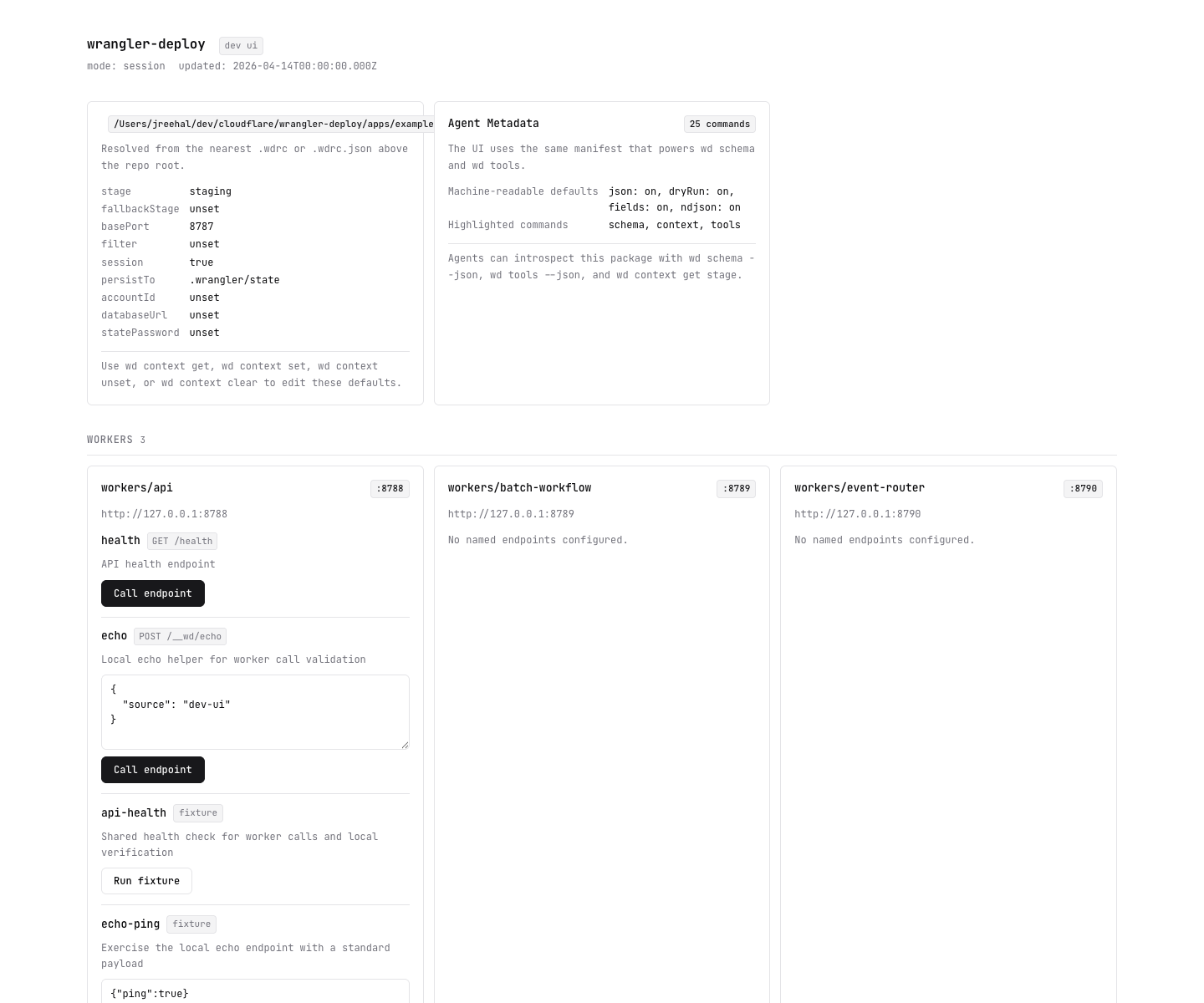
wd dev ui dashboard from the example app.Setting up a staging environment today
Most Workers projects already have wrangler.jsonc. The problem starts when one worker turns into several workers, shared resources, and per-branch environments.
+ payments-db-pr-42 (d1) created
+ cache-kv-pr-42 (kv) created
+ outbox-pr-42 (queue) created
+ payment-api-pr-42 deployed
+ batch-workflow-pr-42 deployed
+ event-router-pr-42 deployed
A better deploy workflow without throwing away your Wrangler workflow.
JSONC stays first-class
Your existing wrangler.jsonc files stay in the repo and stay readable. No rewrite step, no migration away from Wrangler. wd init reads them, wrangler dev still uses them, and wd deploy uses rendered JSONC built for the target stage. The checked-in JSONC remains the thing you author; wrangler-deploy adds orchestration around it.
One tool for dev and deploy
Keep using Wrangler locally, or run wd dev to start every worker together with sane ports and dependency order. When you already applied a stage, wd dev —stage staging can reuse rendered bindings so local runtime matches deploy-time state. When you need Queue local-dev parity, switch to wd dev —session —persist-to .wrangler/state. Add wd dev doctor, wd cron trigger, and wd queue list when you need runtime visibility on top. The benefit is not replacing Wrangler’s primitives. The benefit is turning them into repo-aware workflows so developers stop guessing which worker, which port, and which local route they need.
Typed Env from config
One line — type Env = typeof api.Env — gives you D1Database, KVNamespace, Queue<T>, and Fetcher at compile time. No generated files, no sync step. Rename a binding in config and TypeScript finds every mismatch across every worker.
Shared state across the team
Store state in a Cloudflare KV namespace and stop relying on one laptop having the latest stage metadata. One person can apply, another can deploy, CI can verify or destroy, and everyone sees the same state.
Safer staged deploys
Protected stages refuse destroy without —force. Service bindings decide deploy order. Queue consumers are removed before workers on teardown. Missing secrets block deploy before you get half a release.
More visibility, less guessing
wd plan shows what a stage will create. wd status shows what drifted. wd verify checks rendered config, workers, bindings, and secrets after deploy. It is much easier to explain what the tool is doing because it tells you.
Declare resources once. Types flow everywhere.
wrangler-deploy infers your Worker Env type directly from the resources you declare in config. No build step, no generated files, no type-sync commands. Rename a binding and TypeScript catches every mismatch across every worker.
Full-stack Cloudflare Workers app in one command.
wd create vite my-app scaffolds a working Hono API + Vite frontend with typed bindings, stage config, and a Vite proxy already wired. pnpm dev starts both servers side by side.
+ wrangler-deploy.config.ts typed KV binding, stages pre-configured
+ workers/api/src/index.ts Hono API, Env fully typed
+ workers/api/wrangler.jsonc worker config with KV namespace
+ src/main.ts Vite frontend
+ vite.config.ts /api proxy → worker
➜ vite http://localhost:5173
➜ wrangler http://localhost:8787
Want React instead? wd create react my-app starts from Cloudflare’s official React + Vite + Workers scaffold, then adds wrangler-deploy stage workflows.
One command. 30 seconds. A working Worker.
$ npm create wrangler-deploy@latest my-app
Scaffolds a hello-world Worker, installs dependencies, and prints the dev command. No Cloudflare account required to start — you can deploy when you’re ready.
Already have wrangler.jsonc files? Run wd init in your repo to generate project config from them. Your Wrangler files are not modified.
Already deployed to Cloudflare? Run wd introspect to generate config from the live account.
Then wd apply —stage staging and wd deploy —stage staging when you want a separate environment. Local dev stays on Wrangler; stage deploys use rendered JSONC with the right IDs.