Flows and evidence
document:docs/flowsWrite down how the system behaves, and see what backs each claim.
Most of what a company knows about how its system behaves sits in tickets and in people’s heads. Autocatalog gives that knowledge a home in the repository, and compares it with the code and with what ran. Your system does not need to be event-driven: a status written to a database is enough to start.
Three things stay separate:
| Term | Means | Example |
|---|---|---|
| Business event | Something meaningful happened | Capture started |
| Expected transition | The model says this change should happen | authorised → capturing |
| Observed state change | A system recorded this change | a persisted status write |
A status can be wrong. It can say capturing after the work has died, so a recorded
change shows what was written, not what happened.
After an investigation
Section titled “After an investigation”Write what you learned as a finding, in docs/findings/:
---title: Investigating a capture potentially stuck in capturingowner: Paymentsticket: SUP-1042entity: paymentnature: questionstatus: draftdate: 2026-11-06flow: capturing-a-paymentstep: started---
## What was seen
## What was happening
## How to spot it
## How to recover
nature is behaviour, defect or question. status is the state of the
knowledge: draft, confirmed or superseded. A defect’s own workflow stays in
your tracker. Add resolved with the fix or the answer, and the map stops warning.
Keep the ticket id and the system’s behaviour. Leave out customer names, emails, bank
details, real transaction values and pasted records, because a finding reaches the
site, llms.txt and MCP. Synthetic amounts and business thresholds are fine.
Any kind of document can attach to a flow with flow: and step:, including kinds
you define in the conventions file. A
flow: is a flow’s id, or <repository>/<id> for one another repository keeps.
Model the states
Section titled “Model the states”An entity names the states each field moves through. One entity can have several lifecycles, so they are keyed by field:
---name: Paymentlifecycles: status: states: [authorised, capturing, captured, failed] initial: authorised terminal: [failed]---A flow names what its steps change. A step can override entity and field:
---title: Capturing a paymententity: paymentfield: statussteps: - id: started title: Capture started transition: { from: authorised, to: capturing } code: - { file: src/capture.js, contains: "status: 'capturing'" } rules: - A payment is captured once - { text: Retries are safe, test: test/capture.test.js } stuck: signs: status is capturing and no capture task is running recovery: docs/runbook.md next_steps: - { id: captured, label: the network accepts } - { id: lookup-failed, label: the fee lookup fails } - id: lookup-failed title: Fee lookup failed, capture continues next_step: captured - id: captured title: Payment captured transition: { from: capturing, to: captured, via: worker }---from takes one state or a list. A step needs no transition, because a failure can
change nothing the lifecycle tracks. stuck is prose: nothing times it.
Two steps can share a transition and mean different things. If an operator can set
captured to release a payment, that is its own flow with its own entry point, and
via tells the two apart. ac docs check fails a transition using a state the
lifecycle lacks, and warns about a non-initial state no flow reaches.
Storm a process
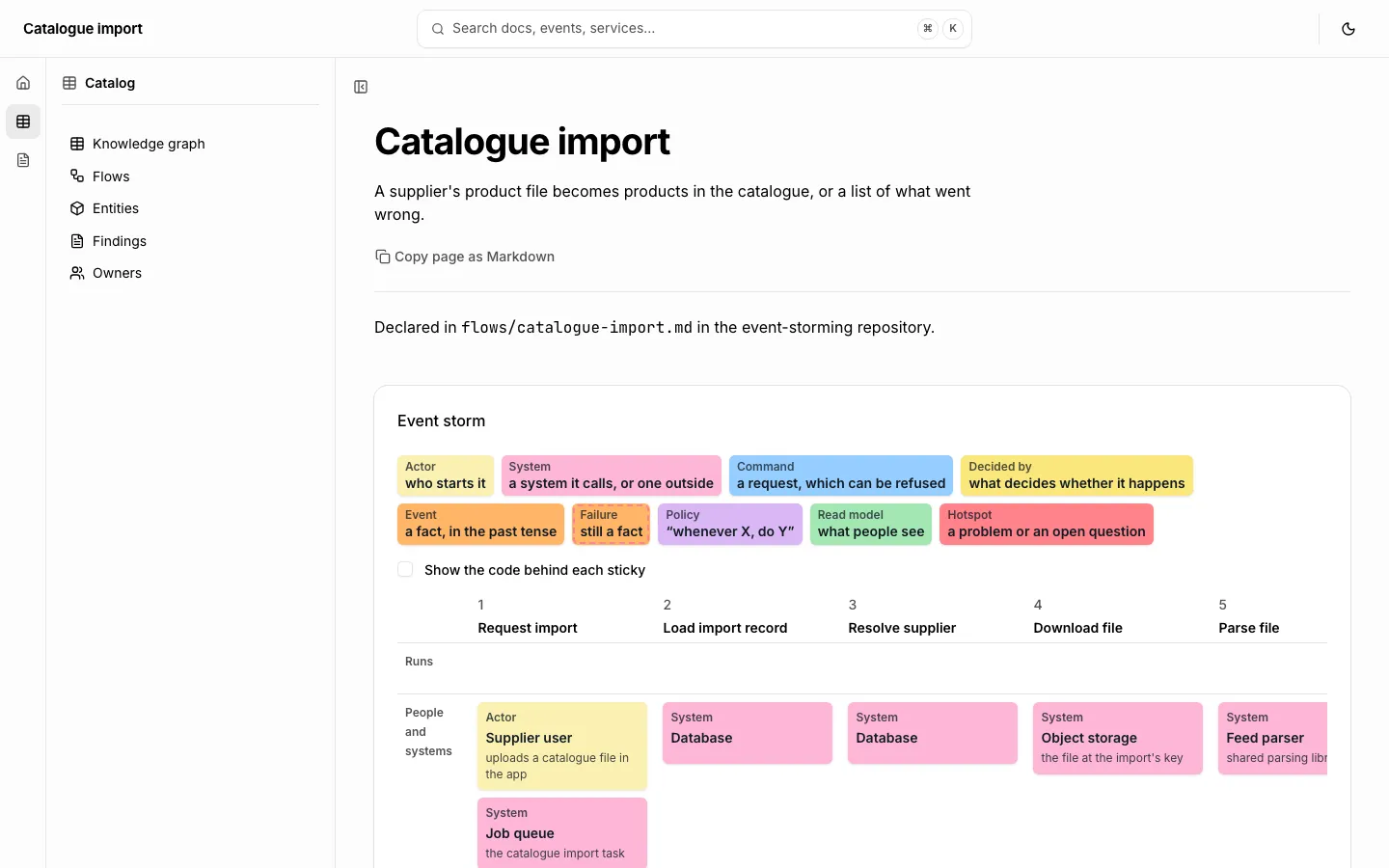
Section titled “Storm a process”A flow page draws an EventStorming board: a column per stage, read left to right, with rows for who takes part, the command, what decides, the facts on the happy and failure tracks, and the policies under them.
Every flow also draws as a map of its steps and branches. Walk through, above the map, steps through it one hop at a time, choosing a branch where the flow splits:
 Write the board in the flow’s
frontmatter, beside the code it describes:
---title: Catalogue importentity: importfield: statussteps: - id: download stage: Download file title: Catalogue file downloaded command: Download catalogue file systems: - { name: Object storage, summary: the file at the import's key } decidedBy: Import code: [{ file: src/import.ts, contains: downloadFile }] next_steps: - parse - { id: file-missing, label: nothing at that key } - id: file-missing title: Catalogue file missing policy: Whenever the file can't be fetched, fail the import next_step: errored - id: ingest stage: Ingest each product title: Product created or updated repeats: once per parsed product flow: ingest-productscenarios: - given: No file at the import's key when: The import runs then: The status is errored and the user is told step: errored---| Field | On the board |
|---|---|
stage | The column. Steps that share a stage stack in one column |
command | The request, or { ref: <domain>/<id> } for a catalog one |
actors, systems, readModels | Who takes part, and what people see |
decidedBy | What decides; a step with a transition defaults to its entity |
policy | “Whenever X, do Y”: one, or a list |
track | happy or failure, over what the board works out |
repeats, flow | A stage that loops, and the flow that zooms into it |
scenarios (on the flow) | Given, When, Then, with expected where today differs |
The happy track follows the first branch out of each step from the start, and
every other step is a failure. A failure is still a fact. One with no policy, no
next step and no status change is a hotspot: the board shows it in the policy
row, and ac docs check warns. A finding on a step with nature: question or
defect tags its sticky and joins the hotspots below the board, beside how each
run can end and the scenarios to test. These checks apply to a flow that uses
any field above; an older flow’s branches may be alternatives, so it draws a
board and raises nothing.
/flows/ lines every flow up as a lane of facts, the big picture, with how many
ways each can fail and how many hotspots are open. flow_context gives an agent
each step’s track, stage and policies, with the hotspots, endings and scenarios.
Draft a board from Effect code
Section titled “Draft a board from Effect code”ac flows draft reads an Effect v4 program with
effect-analyzer and prints a
flow: a stage per call, a failure per error the call can fail with, and the
services it needs as systems. What follows a failure depends on the handler that
catches it. A handler on the call that can succeed carries on to the next step;
one that fails with another error leads to that failure, which joins the board
unless a handler after it on the same call recovers;
a handler around the whole program stops the run. An error nothing catches has
no policy, so it lands on the board as a hotspot to decide, and so does one
caught by a handler the draft cannot read. A program that makes the same call
twice gets two steps, and when the last call can fail, the run’s success is an
ending of its own.
npm install -D effect-analyzerac flows draft src/import.ts --program runImport --id catalogue-import --writeRename each fact in the business’s words, add the policies the team agrees, and
commit it. ac flows verify then checks each step’s code: is still there.
Boards in MDX
Section titled “Boards in MDX”Three components work in any .mdx document without an import:
Every run starts with <Sticky kind="event">Import loaded</Sticky>.
<Storm flow="catalogue-import" show={['hotspots', 'endings']} />
<Storm  label="Catalogue export"  stages={[    { stage: 'Request export', actor: 'Supplier user', command: 'Export catalogue' },    {      stage: 'Write file',      event: 'Catalogue file written',      failure: { text: 'Export too large', hotspot: true },      hotspot: 'What is too large?',    },  ]}/>
<Storm flow> draws a flow’s board, by id or <repository>/<id>. <Storm stages> draws one you sketch by hand before there is code: each stage takes
actor, system, readModel, command, decidedBy, event, failure,
policy and hotspot, each a sticky or a list. <Sticky kind> puts one in a
sentence. On a page of your own, import the React parts from
autocatalog-docs-astro/ui/components: StormBoard, Sticky, StormLegend,
StormHotspots, StormEndings, StormScenarios and BigPicture.
What verified means
Section titled “What verified means”There is no overall status, because each kind of evidence proves something different:
| Evidence | Establishes | Does not establish |
|---|---|---|
| Schema | A state is defined | That anything can reach it |
| Code link | The linked code is there | That the transition succeeds |
| Production count | A transition was recorded | That it happened for the right reason |
| Linked test | It worked under test conditions | That production always behaves so |
ac flows verify --observed transitions.json --writeThis writes flows/evidence.json, with the commit checked and the observation window,
and the flow’s page shows each dimension. Evidence over 30 days old reads as old.
not observedmeans it was instrumented and nothing was recorded in the window.not instrumentedmeans nothing was watching. Both describe coverage, so read them as gaps in evidence.- A rule in prose stays
not checked. A rule with a test readstest linked. - A step with a
viacounts only thatvia. Database-only observation reportsunknown, so it is shown beside the step and never credited to it. - Anything recorded that no flow declares is listed.
- A step edited since the check reads
not checkeduntil you run it again, because the old results were about a different claim.
The command exits 1 only when a claim is contradicted: a state outside the lifecycle or schema, or code that is gone.
Runtime evidence through MCP
Section titled “Runtime evidence through MCP”autotel’s transition() counts persisted
transitions, without depending on trace sampling. Its MCP server reads them back with
get_state_transitions, which returns the file --observed takes. Counts are
best-effort evidence, not an authoritative number.
To investigate, an agent asks flow_context for the flow, then reads each transition
with the observe hints it returns. That is exploration: the agent explains the
record, and ac flows verify decides what counts as a match. Draft findings and
questions come with their status, so an agent can tell a hypothesis from a fact.